Binaural Beat (BB). Meditation recordings that affect brain frequency.
Binaural Beats work on the principle that one frequency is fed into one ear through one headphone and another frequency into the other ear through the other headphone. The brain activity is adapted/adjusted by the difference between these two frequencies. When a frequency of 400 Hz is fed through one headphone and 410 Hz through the other, the brain will reach a frequency of 10 Hz.These frequencies should also be confirmed by EEG devices.
The role of Binaural Beats is not to get a person to the lowest frequencies, which a person can easily reach every day during sleep.
A practical use of Binaural Beats is, for example, if you want to maintain a stable state bordering on wakefulness and sleep, between conscious and unconscious, for a longer period of time during meditation. (Normal sleep is, for most people, a state of unconsciousness most of the time). Binaural Beats help you not to fall asleep in the case of meditation techniques while lying in bed. I speak from my own experience.
It is important to realize that Binaural Beats are not a miracle magic in themselves. You, your consciousness, are always the most important. Binaural Beats are just a tool.
You can notice an interesting auditory illusion if you listen to only the right or only the left earpiece compared to listening to both at the same time.
To explain the context, it is good to recall the different brain frequencies that prevail during different human states/activities:
Brain waves
- Delta Waves – (0.5 – 3 Hz) Unconsciousness, sleep
- Theta Waves – (4 – 7 Hz) The borderline state between sleep and wakefulness
- Alpha Waves – (8 – 12 Hz) Relaxation
- Mu Waves – (7.5 – 12.5 Hz)
- SMR Waves – (12.5 – 15.5 Hz)
- Beta Waves – (15 – 30 Hz) Normal Consciousness
- Gamma Waves – (> 30 Hz) Above-standard high activity
Technical implementation of Binaural Beats. Stereo
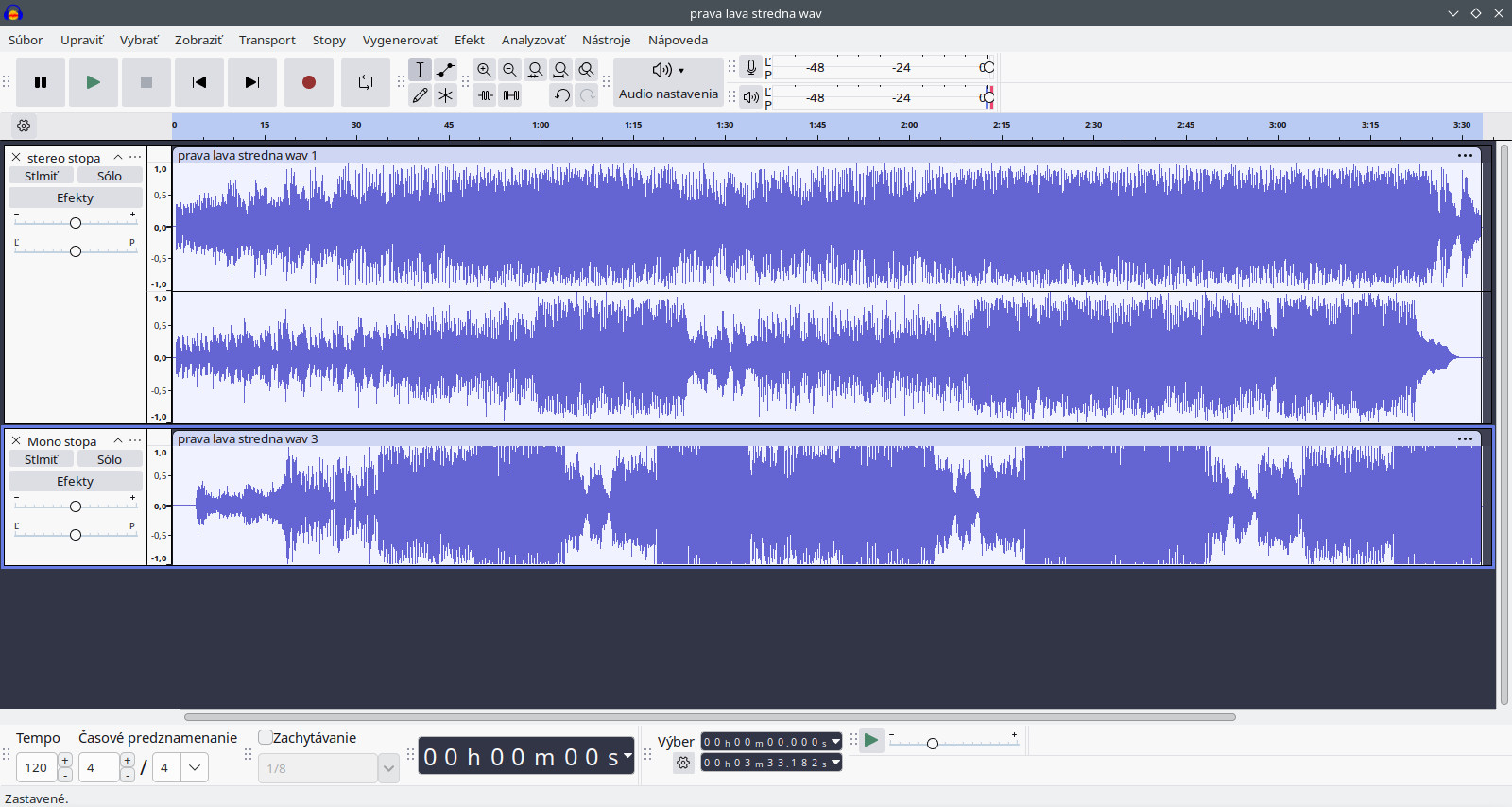
What is the Stereo function? It means that the audio file contains two audio tracks. Right and left. For the right and left headphones. The function is well supported in common player programs, and YouTube also supports it.Within advanced functionality and advanced programs such as FFMPEG, it is also possible to add a third mono track where the given audio track is played by both headphones. This can be, for example, a voice-guided meditation or other meditation music.
Audacity does not fully support muting the right or left channel. It does not support full separation of audio in the right and left channels.
Note that the vast majority of headphones are marked with the right and left sides. Usually with the letters R and L. Derived from the English words right and left.
Further technical details
In general, it is recommended that BB recordings be in a lossless format such as .wav or .flac.This will achieve the highest quality of the recording.
YouTube does not support lossless format.
Lossy formats include mp3 , aac , Vorbis , ogg , and m4a .
The lossy format takes up much less data on the disk, much less space, but at the expense of quality.
.flac is practically the same as .wav, with the difference that .flac is a compression format, which in practice means that it takes up less space on the disk. Approximately half as much as wav. The disadvantage is slightly higher hardware requirements during playback (but for computers or phones younger than 15 years, this disadvantage is irrelevant, and I would definitely prefer .flac over wav).
To be more precise, .m4a, .ogg, and .mkv are not audio codecs or audio formats in the true sense, but only containers. Different containers support different codecs. You can only put Vorbis, .flac, and maybe .opus into an .ogg container. The .m4a container is mainly associated with the aac codec.
Of the lossy formats, the .opus format is the most recommended. It is the most advanced and most maintained. The mp3 format is still the most popular, but from the point of view of IT experts, it is desperately outdated and its use is clearly not recommended.
.opus is used in YouTube videos, for voice messages and phone calls on WhatsApp.
The huge advantage of the MKV container is that it supports absolutely all combinations of audio and video codecs. (Just as a side note, in the video you have a separate audio and video codec/track).
Opus is the only audio format that is very actively maintained. Although 99% of people are hearing about this audio format for the first time, it is actually the absolute peak of technology that we encounter every day.
Vorbis is no longer maintained as often, but it still has a very high value, unlike most audio formats that are no longer maintained at all. Using mp3 is something similar to using a Trabant as a car today. The last maintenance/update of this format was 26 years ago.
But I've already strayed too far from the topic. In the case of BB, we use lossless formats, not lossy.
Basic rule: the frequency should be gradually reduced
If we want to reach the target frequency of 4 Hz, the frequency should be gradually reduced from approximately 16 Hz to 4 Hz. 16 Hz is approximately the state of normal wakefulness. I read it somewhere like that. Otherwise, the brain frequency will not change to the mentioned 4 Hz.For this reason, you can see that in the default settings of Gnaural or Brain Wave Generator, the frequency gradually decreases.
In my opinion, 99% of various Binaural Beats recordings are garbage because they do not follow this rule.
This may also be the reason why older scientific research stated that Binaural Beats affect brain frequency, while newer research suggests otherwise.
The new generation has forgotten the wisdom of the "forefathers". The new recordings are useless.
While the new Binaural Beats generators are useless, the old, old-school ones have their qualities.
Scientific research
- Binaural Beat: A Failure to Enhance EEG Power and Emotional Arousal https://www.frontiersin.org/journals/human-neuroscience/articles/10.3389/fnhum.2017.00557/full
- Binaural beat effect on brainwaves based on EEG https://ieeexplore.ieee.org/document/6530068
- https://en.wikipedia.org/wiki/Beat_(acoustics)#Binaural_beats
- The question is what quality of recordings they used in scientific research, what methodology they had, and what they were looking for. A person can get into a lower brain frequency even without a Binaural beat, just by closing their eyes. By monitoring the stability of the frequency, researchers could come to interesting conclusions.
Types of meditation techniques suitable for Binaural Beats
- Intense relaxation of skeletal and facial muscles.
- working with the energy body
- working with chakras
- meditation of heavy body, heaviness of limbs, and the like
Gnaural Program. Binaural Beats Generator
https://gnaural.sourceforge.net/https://www.youtube.com/watch?v=olpwB-8s4Ak
A very old, but still usable program. Since it is open source, any programmer can upload it to GitHub and develop it further.
The author claims that he uses spikes in frequencies so that a person does not fall asleep during meditation. Short-term increase in frequency.
He claims that it works better at a lower base frequency.
(The problem is that very low frequencies are quite unpleasant to listen to, and extremely low frequencies are inaudible to the human ear. You don't need to overdo it with low frequencies).
It has a higher frequency on the left and a lower frequency on the right in the default settings.
Gnaural supports the Android version. The disadvantage is that this version does not support the generation of audio files, does not allow editing and customization of BB. It only works on old versions of Android.
It supports the .deb Linux version and the Windows version. Both have a bug/shortcoming that they do not allow you to add your own sounds. The programmer is able to fix these problems with further development.
Java version support.
It lets a higher frequency into the left ear.
BrainWave Generator. Binaural Beats Generator
https://www.bwgen.comhttps://www.softpedia.com/get/Multimedia/Audio/Other-AUDIO-Tools/BrainWave-Generator.shtml
Old school. The last version of the program was released, I think, in 2005. That's why I like the program and appreciate its qualities. New programs are worthless.
The application is no longer compatible with modern versions of Windows, and the program crashes frequently. How can this be minimized?
For example, follow the instructions below – compatibility mode.
Two approaches to Binaural Beats. The frequency of the base sound and the generation of beats
- Fundamental frequency – the method described above
- Generating beats – imagine a drummer regularly making beats. We speed up the recording of these beats in the editor many times, so that there will be, for example, 50 beats per second. In the other earbud, we set the beat frequency to 46 beats per second. It is much easier to generate synthetic sound this way using software.
Audacity plugin
I see great potential if a programmer created a Binaural beats generator as an open-source plugin for the Audacity audio editor. It's 100 times less work than programming such a program from scratch. However, the plugin must have at least the same functionalities as Gnaural or Brain Wave Generator. It should also include the functionality of generating the aforementioned beats.SOFA (Spatially Oriented Format for Acoustics)
https://www.sofaconventions.org/mediawiki/index.php/SOFA_(Spatially_Oriented_Format_for_Acoustics)FFMPEG creation of three channels / tracks. Right, left, both sides
ffmpeg -i input.wav -i input2.wav -i input3.wav-filter_complex "[0:a][1:a][2:a]join=inputs=3:channel_layout=5.1[a]" -map "[a]" output.wav
https://trac.ffmpeg.org/wiki/AudioChannelManipulation#a2stereostereo
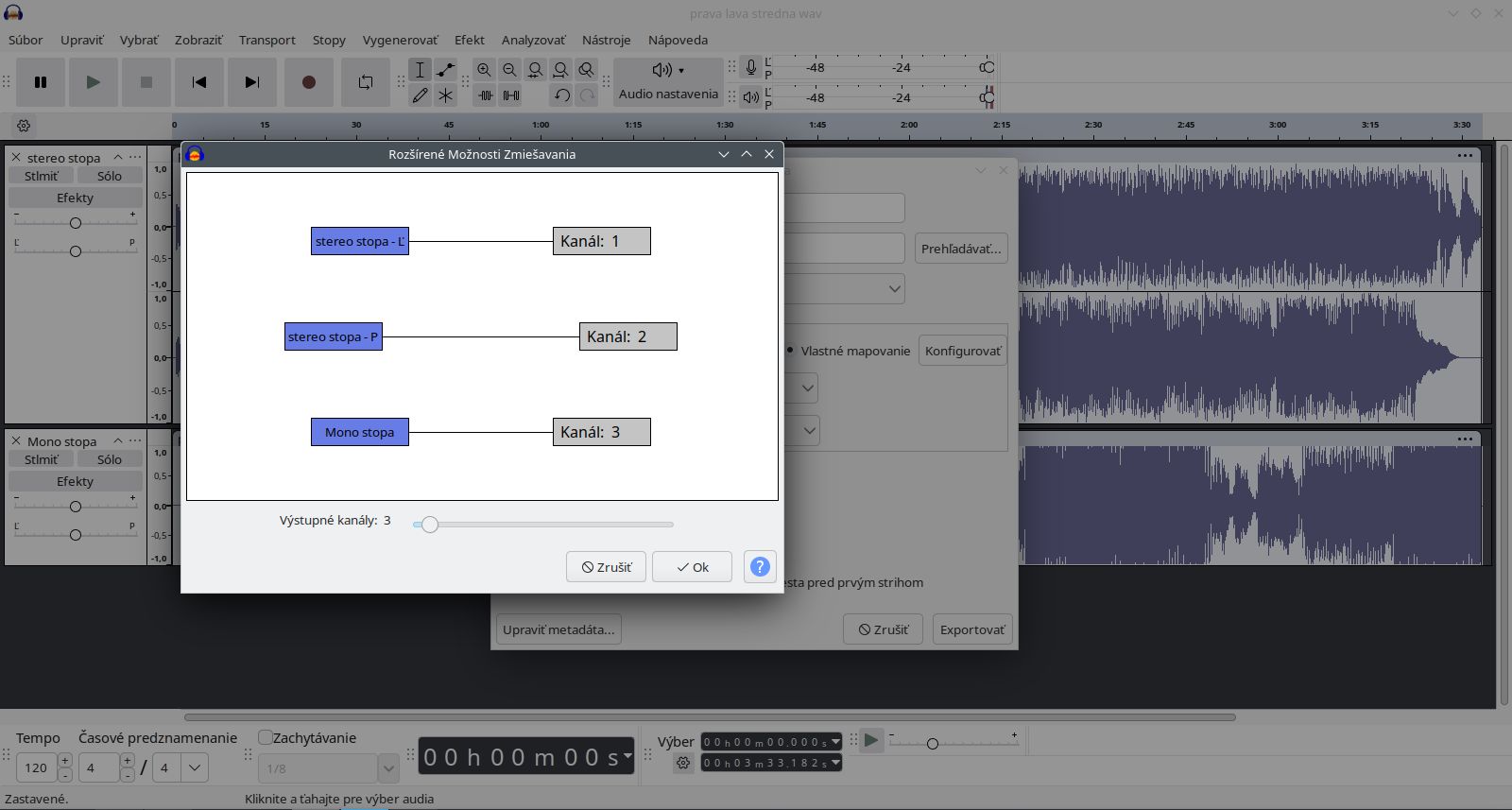
Audacity three-channel audio file
https://manual.audacityteam.org/man/advanced_mixing_options.htmlI have found a way to create an audio file where one channel transmits sound to the right earphone, the second channel/track to the left earphone, and the third track to both earphones. Add one more mono track to the stereo two-channel file. (The mono track goes to both earphones)
Subsequent procedure:
- Export audio
- custom mapping
- configure
- save/export in default settings